


What Are the 3 Biggest Custom Baseball Pin Design Mistakes?
Avoid the 3 biggest mistakes when designing baseball pins by using high-resolution vector artwork, keeping font sizes at least 5pt, and simplifying overly complex designs. Low-resolution logos create blurry pins, tiny text becomes unreadable, and excessive detail gets lost in production. Stick to bold shapes, minimum 0.3mm line thickness, and 4-6 colors for crisp, professional custom baseball pins.
How Can You Avoid Low-Resolution Logo Mistakes in Baseball Pin Design?
Low-resolution logos are the most common custom baseball pin design mistake because pixelated artwork produces blurry, unprofessional pins. Always submit vector files (AI, EPS, SVG) or high-quality 300 DPI PNG images to ensure crisp metal outlines and clean color fills.
File Format Quality Guide for Baseball Pins
When you submit a low-resolution screenshot or compressed image, the manufacturer cannot magically create detail that doesn’t exist. The metal lines will appear fuzzy, enamel colors will bleed, and your team’s logo will look unprofessional on the final pin.
Vector artwork is ideal because it uses mathematical paths rather than pixels, meaning it scales perfectly to any size without quality loss. This is crucial for custom baseball pins, which are typically 1–1.5 inches in size—small enough that even minor imperfections become obvious.
If you only have a low-resolution logo, contact MGM Crafts for their 100% free professional design service. Their team can recreate your logo in vector format with unlimited revisions until it’s production-ready. Never rush your design submission; taking time to prepare proper artwork prevents costly mistakes and ensures your custom baseball pins look sharp.
What Font Size Problems Ruin Custom Baseball Pin Text?
Font sizes that are too small are the second biggest mistake in custom baseball pin design because text under 5pt becomes unreadable once cast in metal. Hairline scripts and delicate serifs look beautiful on screen but disappear or blur during production, leaving your team name or year illegible.
Font Guidelines for Baseball Pin Design
Metal outlines (called “dam walls”) hold enamel colors in place during production. If your font’s lines are thinner than 0.3mm, those metal walls disappear or the enamel bleeds through, making letters merge together. This is especially problematic for team names, years, or player numbers that serve as the pin’s identifying features.
Test your font by shrinking your design to 150–200 pixels tall—if you cannot read it at that size, it will be unreadable on the actual pin. Prefer bold, sans-serif fonts like Impact, Arial Black, or Helvetica Bold over delicate scripts like Parisian or Great Vibes.
When designing custom baseball pins, remember that text must compete with visual elements. If your mascot or logo is complex, simplify or remove text entirely rather than shrinking it to fit. A clean, readable team name is more valuable than a crowded design where nothing is clear.
MGM Crafts’ design team reviews all artwork for font readability before production and will suggest improvements during their free design service if text is too small.
Why Do Overly Complex Designs Fail in Baseball Pin Production?
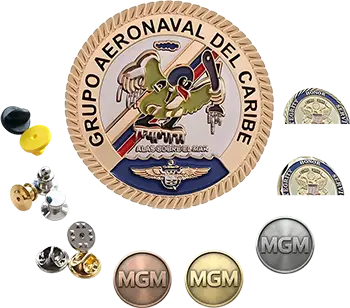
Overly complex designs fail because pins are only 1–1.5 inches, leaving minimal space for hair-thin strokes, tiny textures, or intricate details that get lost during manufacturing. Trying to fit too much detail into a small space creates muddy, indecipherable custom baseball pins that look unprofessional.
Design Complexity Comparison
Manufacturers typically include 4–6 colors in base pricing, and extra colors significantly increase costs. A smart 4-color pin with strong contrast often looks cleaner and more professional than a 12-color pin with muddy details.
Ultra-skinny or spiky shapes can bend, snag on clothing, or wear awkwardly over time. Favor balanced forms like circles, ovals, or hearts, or add subtle reinforcement to protruding elements. Designs should sit flat and wear comfortably on uniforms or caps.
The “Mona Lisa mistake” occurs when designers try to create mini-masterpieces on pins. Instead, choose one bold concept and simplify until the design feels iconic—not crowded. Your art might be stunning at full size, but enamel pins require distillation to the most essential elements.
Think of your custom baseball pin design like a team mascot: it should be instantly recognizable even at a distance. If someone squints at your pin from 3 feet away, can they still identify your team? If not, simplify further.
How Do You Test Your Baseball Pin Design Before Production?
Test your baseball pin design by shrinking it to 150–200 pixels tall and checking if all elements remain readable, then verify line thickness meets 0.3mm minimum and color areas are at least 0.3mm wide.
Start by viewing your design at actual pin size (1–1.5 inches) on your screen. Can you read all text clearly? Are metal lines thick enough to see? Do colors bleed into each other? If any element fails, revise before submitting.
Print your design at 100% scale and hold it at arm’s length. This simulates how the pin will look when worn. Squint your eyes slightly—if details disappear, they’re too small for production.
Ask three people who haven’t seen your design to describe what they see. If they cannot immediately identify your team mascot, logo, or text, the design is too complex.
Before final submission, request a proof from your manufacturer. MGM Crafts provides proof reviews as part of their free design service, catching issues before molds are cut. Never skip this step—changes after production are impossible.
What Are the Line Thickness Rules for Custom Baseball Pins?
Line thickness rules require metal outlines to be at least 0.3mm thick and color areas to be at least 0.3mm wide, otherwise details disappear or enamel bleeds during production.
Metal lines act as “dam walls” separating enamel colors. Lines thinner than 0.3mm cannot hold enamel properly, causing colors to merge and creating muddy, indistinct areas. On screen, 0.3mm may look chunky, but it produces crisp, durable pins that last.
For text specifically, set fonts to at least 5pt to ensure line thickness meets the 0.3mm minimum. Delicate scripts with hairline strokes will fail regardless of font size if individual strokes fall below this threshold.
If your design has thin lines you want to keep, consider converting those areas to metal rather than color-filled. Small areas often work better as exposed metal than as tiny enamel sections.
Which Color Count Strategy Works Best for Baseball Pins?
The best color count strategy for baseball pins uses 4–6 bold, high-contrast colors rather than 10+ detailed hues, as extra colors increase costs and complex palettes create visual clutter.
Manufacturers include 4–6 colors in base pricing. Each additional color typically adds cost, making 12-color pins significantly more expensive than 5-color versions. Simplify your palette and lean on contrast rather than more hues for visual impact.
Use Pantone-coated colors for accuracy, as manufacturers match to coated Pantone standards rather than uncoated or RGB values. If your team colors include gradients or shading, convert them to solid color blocks—gradients cannot be reproduced in enamel pins.
Each color must be outlined in a single metal color and separated by raised metal lines. Avoid color combinations that clash or create optical vibration (like bright red next to bright green), which can make pins look jarring rather than professional.
MGM Crafts Expert Views
“After 20+ years manufacturing custom metal crafts for over 10,000 overseas clients, I’ve seen every custom baseball pin design mistake imaginable. The most common issue is DIY designers submitting low-resolution screenshots or tiny fonts that simply cannot translate to metal. At MGM Crafts, we never charge for design corrections—we provide 100% free professional design service with unlimited revisions because we believe every team deserves beautiful pins, regardless of their design skills. The key is simplicity: bold lines at 0.3mm+, text at 5pt minimum, and 4-6 colors maximum. When clients trust this process and collaborate with our design team, their custom baseball pins always turn out crisp, professional, and worthy of their team’s pride. Rushing the design phase is the true enemy—take time, test at small size, and let us help refine your vision.”
How Can You Fix Design Mistakes Before Submitting to Manufacturers?
Fix design mistakes before submission by converting raster images to vector format, increasing font sizes to 5pt minimum, thickening lines to 0.3mm, and reducing color count to 4–6 bold hues.
If you lack design software, use MGM Crafts’ free professional design service instead of attempting fixes yourself. Their team has recreated thousands of logos into production-ready vector artwork with unlimited revisions until you’re satisfied.
For existing designs, ask for a pre-production proof and carefully review every element. If anything looks questionable—a line too thin, color off, spacing tight—raise it immediately before molds are cut.
Conclusion
Avoiding the 3 biggest custom baseball pin design mistakes—low-resolution logos, font sizes too small, and overly complex designs—ensures your pins look professional and last season after season. Use vector files (AI/EPS/SVG) or 300 DPI PNGs, keep fonts at 5pt minimum with bold sans-serif styles, and simplify to bold shapes with 4–6 colors.
Key Takeaways:
-
Submit vector artwork or 300 DPI minimum to avoid blurry pins
-
Keep font sizes at 5pt+ with bold sans-serif fonts for readability
-
Maintain 0.3mm minimum line thickness for metal outlines
-
Limit colors to 4–6 for cost efficiency and visual clarity
-
Test designs at 150–200px tall to confirm readability
-
Use MGM Crafts’ free design service for professional help
Actionable Advice: Before submitting your custom baseball pin design, shrink it to thumbnail size and verify all text is readable, lines are thick enough, and colors are distinct. If unsure, contact MGM Crafts for their no-cost design review—they’ll catch issues before production and offer unlimited revisions. Never rush your design; proper preparation prevents costly mistakes and ensures your team’s pins become treasured trading collectibles.
Frequently Asked Questions
What file format is best for custom baseball pin design?
Vector files (AI, EPS, SVG) are best because they scale perfectly without quality loss. If you lack vector art, submit high-resolution PNG at 300 DPI minimum. Avoid screenshots or JPEGs under 300 DPI as they produce blurry pins.
How small can text be on a baseball pin and still be readable?
Text must be at least 5pt with line thickness of 0.3mm minimum. Test by shrinking your design to 150–200 pixels tall—if you cannot read it at that size, increase the font size.
How many colors should I use in my custom baseball pin design?
Use 4–6 bold, high-contrast colors for best results. Extra colors increase costs significantly, and a smart 4-color pin often looks cleaner than a 12-color one with muddy details.
Can you fix a low-resolution logo for my baseball pin?
Yes. MGM Crafts offers 100% free professional design service with unlimited revisions to recreate low-resolution logos into production-ready vector artwork. You don’t need perfect artwork to start—they’ll help refine it.
What is the minimum line thickness for custom pin design?
Metal lines must be at least 0.3mm thick, and color areas must be at least 0.3mm wide. Lines thinner than this will disappear or cause enamel to bleed during production.
